this는 어떻게 동작할까?
시작으로
this는 객체와 연관이 깊다.
var test = {
  type : "car",
  brand : "volo"
}
위의 test 객체에서 this.test.type == "car", this.test.brand == "volo" 으로 호출될 것이다.
여기서 변수 test는 this의 콘텍스트(context) 객체라고 할 수 있다.
콘텍스트(context)객체는 this가 바라보고 있는 어떠한 객체라고 이해하면 된다.
이제 this의 4가지 동작 방식에 대해 알아보자
1. 전역 문맥에서 this
전역 맥락에서의 this는 엄격 모드 여부와 관계없이 전역 객체를 참조한다.
// 웹 브라우저에서는 window 객체가 전역 객체
console.log(this === window); // true

a = 37;
console.log(window.a); // 37

this.b = "MDN";
console.log(window.b)  // "MDN"
console.log(b)         // "MDN"
- 크롬 개발자 도구에서
this를 입력하면 window 객체를 출력한다.

- node 쉘에서
this를 입력하면 자바스크립트 실행 환경의 전역객체를 출력한다.
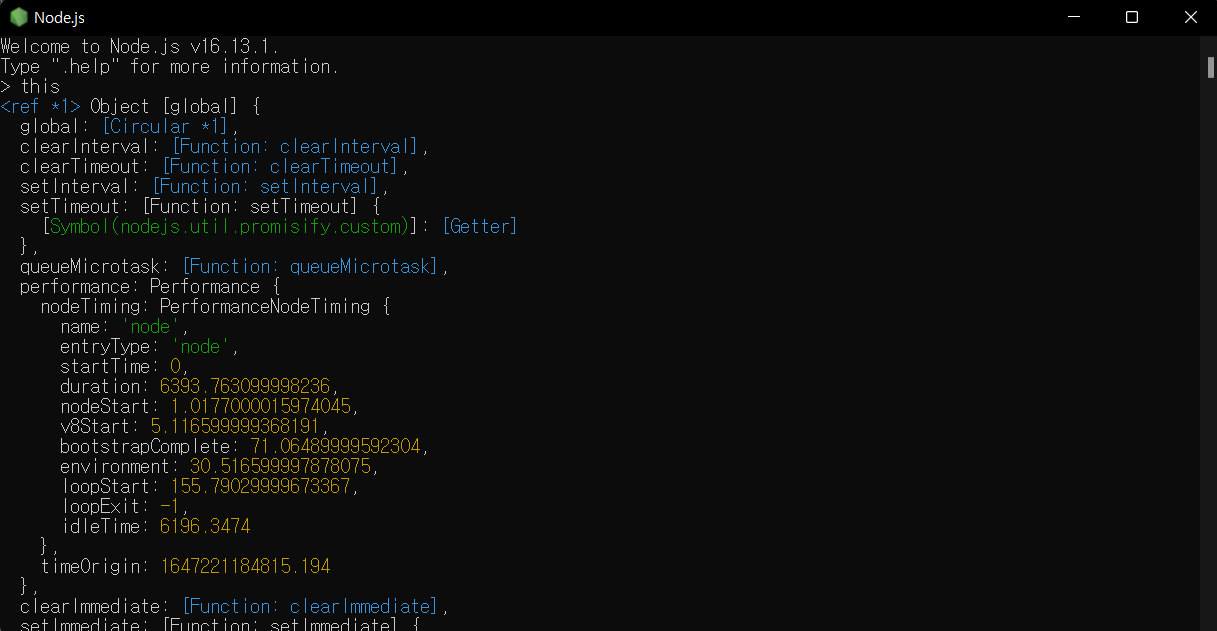
정리해서, 전역 스코프에서 정의한 변수는 전역 객체에 등록된다.
따라서 var a=37은 window.a=37과 같다.
this 객체에 프로퍼티를 등록하는 것은 (예시 : this.b=10) 전역 스코프에서 변수를 선언한 것과 같다는 말이다.
1. 함수 문맥 - 단순호출
함수 내부에서 this의 값은 함수를 호출한 방법에 의해 좌우된다.
여기서 단순호출은 this의 값이 호출에 의해 설정되지 않았기 때문에, window인 전역 객체를 참조하게 된다.
function f1() {
  return this;
}

// 브라우저
f1() === window; // true

// Node.js
f1() === global; // true
// 변수를 선언하고 변수에 프로퍼티로 전역 window를 할당
var a = 'Global';

function whatsThis() {
  return this.a;  // 함수 호출 방식에 따라 값이 달라짐
}

whatsThis();  // 'Global'
2. 함수 문맥 - 객체의 메서드 호출
함수를 어떤 객체의 메서드로 호출하면 this의 값은 그 객체를 사용한다.
var obj = {
    prop : 10,
    f: function(){
        console.log(this.prop);
    }
}

obj.f();
어떤 객체를 통해 함수를 호출한다면, 그 객체가 바로 this의 context 객체가 된다. 즉, obj라는 객체가 this가 된다는 말이다.
var a = 30;

var obj = {
    prop : 10,
    f: function(){
        console.log(this.prop);
    },
    f2: function(){
        console.log(this.a);
    }
}

obj.f();  // 10
obj.f2(); // undefined
위의 코드에서 f2()의 this는 전역객체의 a변수를 참조하지 못한다.
그 이유는 obj 객체의 내부 this를 참조하기 때문이다.
var a = 30;

var obj = {
    prop : 10,
    f: function(){
        console.log(this.prop);
    },
    f2: function(){
        console.log(this.a);
    }
}

var global_obj = obj.f2;

obj.f();      // 10
global_obj(); // 30
그렇다면, global_obj()은 어떻게 30을 출력할 수 있을까?
그 이유는 간단하다.
varglobal_obj는 전역 스코프에서 등록된 변수이므로 전역 객체에 등록된다. 즉, window.global_obj = obj.global_objthis가 전역 객체(window)를 context 객체로 갖는다.- 따라서,
this는 전역 객체 변수인a=30을 참조하게 되는 것이다.
3. 함수 문맥 - call, apply, bind 메서드 호출
함수 객체는 Call, Apply, Bind 메소드를 가지고 있는데, 첫 번째 인자로 넘겨주는 것이 this context 객체가 된다.
이를 명시적 바인딩이라 한다. this의 값을 한 문맥에서 다른 문맥으로 넘기려면 call()이나 apply()를 사용해야 한다.
var obj = {name: 'seongsik', old:"20"};

var name = 'Global';

function whatsThis() {
  console.log(this.name);
}

whatsThis();            // Global
whatsThis.call(obj);    // seongsik
whatsThis.apply(obj);   // seongsik
- call의 두 번쨰 인자부터는 순서대로 들어간다.
function func(c, d) {
    console.log('this.a :', this.a);
    console.log('this.b :', this.b);
    console.log('c :', c);
    console.log('d :', d);
}

var o = {a: 1, b: 3};


// 첫 번째 인자는 'this'로 사용할 객체이고,
// 이어지는 인자들은 함수 호출에서 인수로 전달된다.
func.call(o, 5, 7);

// this.a : 1
// this.b : 3
// c : 5
// d : 7

func.call(o, [5, 7]);
// this.a : 1
// this.b : 3
// c : (2) [5, 7]
// d : undefined
- apply의 두 번째 인자부터는 array 형태로 넘겨줘야 한다.
function func(c, d) {
    console.log('this.a :', this.a);
    console.log('this.b :', this.b);
    console.log('c :', c);
    console.log('d :', d);
}

var o = {a: 1, b: 3};

// 첫 번째 인자는 'this'로 사용할 객체이고,
// 두 번째 인자는 함수 호출에서 인수로 사용될 멤버들이 위치한 배열이다.
func.apply(o, [5, 7]);
// this.a : 1
// this.b : 3
// c : 5
// d : 7

func.apply(o, 5, 7); // TypeError: CreateListFromArrayLike called on non-object
4. 함수 문맥 - 생성자(New) 함수 호출
함수를 new 키워드와 함께 생성자로 사용하면 this는 새로 생긴 객체에 묶인다.
주의해야할 사항으로는 new 키워드와 함께 생성자 함수를 호출하지 않으면 생성자 함수로 동작하지 않는다.
function Create_fn(name){
    this.name = name;
}

var fn1 = new Create_fn('seongsik');
console.log(fn1.name); // seongsik

// new 키워드와 함께 생성자 함수를 호출하지 않으면 생성자 함수로 동작하지 않는다.
var fn2 = Create_fn('gildong');
console.log(fn2.name); // Cannot read properties of undefined (reading 'name')
Javascript의 new 키워드는 클래스의 인스턴스화가 아닌 단순히 함수를 실행시켜주는 것이다.
밑의 코드를 실행시키면 return에 객체를 반환하는 것을 확인할 수 있다.
function Person(name) {
  this.name = name;
  this.age = 20;

  console.log('function 실행!!');

  return {name : this.name, age : this.age};
}

var per = new Person('seongsik'); // function 실행!!
console.log(per); // {name: 'seongsik', age: 20}